
USB pinouts and wiring reference
Quick answer
- Standard USB 2.0 cables use four wires: red (power), white (D-), green (D+), black (ground), across Type-A, Type-B, Mini and Micro USB.
- USB-C uses 24 pins and doesn't follow a simple colour code due to its multi-protocol support.
- Access Communications stocks USB cables and assemblies across every connector type covered here.
Understanding USB pinouts is essential for cable repair, custom cable assembly, troubleshooting connection issues, and identifying conductors during installation. This guide provides pin assignments, wire colour codes, and pinout diagrams for every USB connector type from Type-A through to USB-C.
For USB connector measurements and panel cutout sizes, see our USB Connector Dimensions guide. For USB standards, speeds, and Power Delivery, see our USB Overview.
Standard USB 2.0 cable colour code
The four-conductor cable used for USB 1.1 and USB 2.0 follows a standard colour convention across virtually all manufacturers. This applies to USB Type-A, Type-B, Mini-USB, and Micro-USB cables.
| Pin | Wire colour | Function | Description |
|---|---|---|---|
| 1 | Red | VBUS (+5V) | Power supply, +5V DC |
| 2 | White | D- | Data minus, differential signal |
| 3 | Green | D+ | Data plus, differential signal |
| 4 | Black | GND | Ground, 0V reference |
Memory aid: Red = power, Black = ground, the data pair (D+ and D-) sits between them.
USB Type-A pinout
USB Type-A is the rectangular connector found on computer hosts, USB hubs, and the upstream end of standard USB cables. Pin numbering runs left to right when looking at the contacts of the plug.
| View | Plug | Receptacle |
|---|---|---|
| USB 2.0 Type-A | 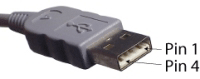 |
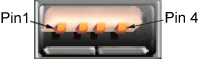 |
USB 3.0 Type-A adds five additional SuperSpeed contacts at the rear of the connector, giving 9 pins total. The original 4 contacts remain in the same position for backward compatibility.
USB Type-B pinout
USB Type-B is the square connector typically used on the device side for printers, scanners, audio interfaces, and other larger peripherals.
| View | Plug | Receptacle |
|---|---|---|
| USB 2.0 Type-B | 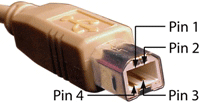 |
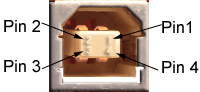 |
USB Type-B uses the same 4-pin colour code as Type-A. USB 3.0 Type-B adds a stacked SuperSpeed section above the original 4 contacts, making the connector physically taller than USB 2.0 Type-B. A USB 3.0 Type-B plug will not fit a USB 2.0 Type-B receptacle, but a USB 2.0 Type-B plug will fit a USB 3.0 Type-B receptacle.
Mini-USB pinouts
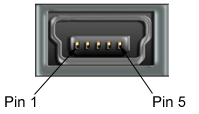
Mini-USB connectors use 5 pins instead of 4. The extra pin (ID) is used for USB On-The-Go (OTG) functionality, allowing the device to detect whether it should act as a host or a peripheral.
| Connector | Plug | Receptacle |
|---|---|---|
| Mini-USB Type-A | 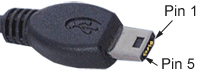 |
 |
| Mini-USB Type-B | 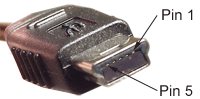 |
Mini-USB Type-A pinout
| Pin | Wire colour | Function |
|---|---|---|
| 1 | Red | VBUS (+5V) |
| 2 | White | D- |
| 3 | Green | D+ |
| 4 | Joined to pin 5 | ID |
| 5 | Black | GND |
Mini-USB Type-B pinout
| Pin | Wire colour | Function |
|---|---|---|
| 1 | Red | VBUS (+5V) |
| 2 | White | D- |
| 3 | Green | D+ |
| 4 | Not connected (*) | ID |
| 5 | Black | GND |
(*) Sometimes joined to pin 5 via a resistor
Micro-USB pinout
Micro-USB Type-B uses the same 5-pin layout as Mini-USB. Wire colours and function assignments are identical.
| Pin | Wire colour | Function |
|---|---|---|
| 1 | Red | VBUS (+5V) |
| 2 | White | D- |
| 3 | Green | D+ |
| 4 | Not connected or floating | ID |
| 5 | Black | GND |
For OTG-capable Micro-USB Type-B receptacles, pin 4 (ID) is connected to ground via a resistor inside the OTG cable. This signals to the device that it should act as a USB host.
USB Type-C pinout
USB Type-C uses 24 pins arranged in a symmetrical pattern, allowing the connector to be inserted either way up. Pins are mirrored across the centre line, with each side providing the same signals.
| Pin | Function | Description |
|---|---|---|
| A1, A12, B1, B12 | GND | Ground return path |
| A2, A3, B10, B11 | SSTXp1, SSTXn1, SSRXp1, SSRXn1 | SuperSpeed differential pair 1 |
| A4, A9, B4, B9 | VBUS | Bus power, 5-48V |
| A5, B5 | CC1, CC2 | Configuration channel (cable orientation, USB-PD) |
| A6, A7, B6, B7 | D+, D- | USB 2.0 differential pair |
| A8, B8 | SBU1, SBU2 | Sideband use (Alternate Mode signalling) |
| A10, A11, B2, B3 | SSTXp2, SSTXn2, SSRXp2, SSRXn2 | SuperSpeed differential pair 2 |
USB Type-C does not use simple wire colour codes because the connector supports multiple protocols (USB 2.0, USB 3.x, USB4, DisplayPort, HDMI, Thunderbolt) and dynamic Power Delivery negotiation. Internal cable construction varies depending on the cable's rated capabilities.
Frequently asked questions
What are the USB wire colours?
Standard USB 2.0 cables use four wires: red (VBUS, +5V), white (D-), green (D+), and black (ground). This applies to USB Type-A, Type-B, Mini-USB, and Micro-USB cables.
Which USB pin is positive?
Pin 1 is the positive power pin, carrying +5V. The wire is red. Pin 4 (or pin 5 on Mini-USB and Micro-USB) is ground, with a black wire.
Are USB-A and USB-B pinouts the same?
Yes, the four-pin assignment is identical. Pin 1 is power, pin 2 is D-, pin 3 is D+, pin 4 is ground. The connectors are physically different but the electrical pinout is the same.
What does the ID pin do on Mini-USB and Micro-USB?
The ID pin (pin 4) is used for USB On-The-Go (OTG) functionality. When grounded through a resistor in an OTG cable, it signals to the device that it should act as a USB host rather than a peripheral. This allows phones and tablets to host USB devices like keyboards and storage drives.
Why doesn't USB-C use simple wire colours?
USB-C uses 24 pins to support multiple high-speed differential pairs, configuration channels, sideband signalling, and dynamic Power Delivery. The internal cable construction is too complex for a simple four-colour code. Cable specifications are tested and certified by manufacturers rather than identified by wire colour.
Can I repair a USB cable using the colour code?
For USB 2.0 cables (Type-A, Type-B, Mini-USB, Micro-USB), yes. Match red to red, white to white, green to green, black to black. The shield (drain wire) connects to the connector body. For USB 3.0 and later, repair is not practical because the additional SuperSpeed pairs require precise impedance matching.
What's the difference between USB-A pin numbering on the plug vs receptacle?
Pin numbering is mirrored. Looking at the contacts, USB-A plug pins read 1-2-3-4 left to right, while the receptacle reads 4-3-2-1 left to right. The functions still match correctly because the plug and receptacle face each other when mated.
Additional reference material
For connector dimensions and panel cutout sizes, see our USB Connector Dimensions guide.
Need USB cables or custom assemblies? Browse our USB cables and hubs range or talk to an expert for custom-built solutions.
Your Project, Perfected. That's The Access Advantage.
- Expert Local Support, Since 1973: Don't waste time with guesswork. Our experts have seen it all and are ready to provide the right solution, right now. Your success is our business.
- Your Specs, Your Brand, Our Build: Off-the-shelf not cutting it? We specialise in building custom cables and assemblies to your exact specifications, branded for your business. Let's create it together.
- Guaranteed for Life: Buy it once. Trust it forever. Our products are backed by a limited lifetime warranty, so you can invest in quality with zero risk. *Warranty excludes third-party brands such as HALO and UPS.
Let's get your project started.
Talk to an expert today for a custom quote or browse the solutions most relevant to your search.