
UTP vs F/UTP vs S/FTP: Which cable shielding do you actually need?
Quick answer
- Standard offices and homes need UTP. Industrial sites, hospitals and data centres need S/FTP. Moderate EMI environments need F/UTP.
- Shielded cable only works if it's grounded at both ends, otherwise it performs no better than UTP.
- Access Communications stocks professional-grade UTP, F/UTP, and S/FTP cable, all with 100% solid copper conductors.
The acronyms used to describe Ethernet cables refer to the type of shielding used around the twisted pairs. Shielding protects the cable from electromagnetic interference (EMI) and crosstalk, which is crucial in electronically noisy environments. This guide explains the common variants and when each is actually worth the cost premium.
Understanding cable shielding types
The three types Access Communications stocks look like this in cross-section. UTP has no shielding, F/UTP adds a single foil screen around all four pairs, and S/FTP adds individual foil screens on each pair inside an overall braided shield.
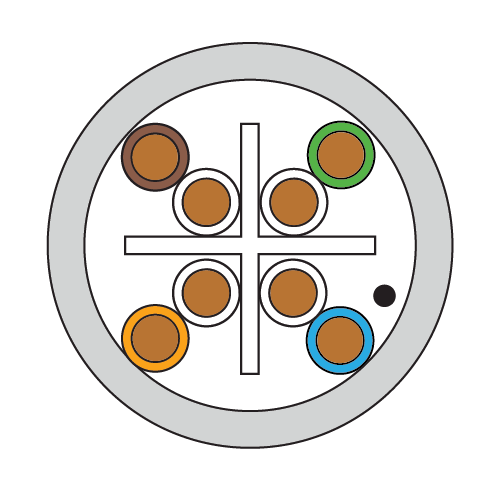 UTP No shielding |
 F/UTP Overall foil shield |
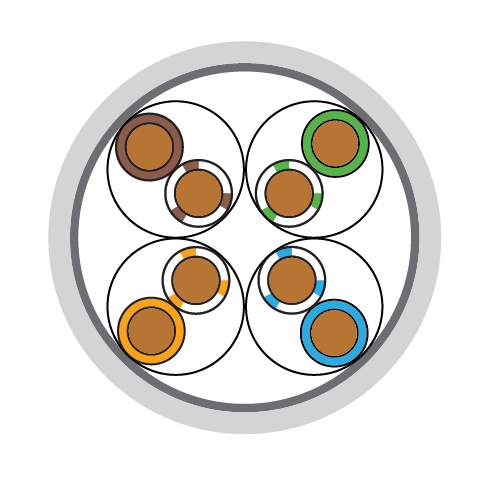 S/FTP Foil per pair plus braid |
The full set of shielding codes is shown below. Manufacturers use these terms inconsistently, so the table maps each type to its common aliases.
| CABLE TYPE (USED BY Access Communications) |
ALSO KNOWN AS | CABLE SHIELDING | PAIR SHIELDING |
|---|---|---|---|
| UTP Unshielded Twisted Pair: No shielding. The twisted pairs alone protect against interference. Standard cable for offices and homes. |
U/UTP | None | None |
| F/UTP Foil Twisted Pair: Overall foil shield across all twisted pairs. Prevents electromagnetic interference (EMI) from entering or exiting the cable. |
FTP, STP, ScTP | Foil | None |
| S/FTP Shielded Foil Twisted Pair: Individual foil shields on each pair plus outer braided shield. Maximum protection against EMI and crosstalk between pairs. |
SSTP, SFTP, STP, PiMF | Braiding | Foil |
| S/UTP Screened Unshielded Twisted Pair: Overall braided shield around all pairs without individual pair shielding. Better mechanical strength than F/UTP. |
STP, ScTP | Braiding | None |
| SF/UTP Screened Foil Unshielded Twisted Pair: Both braided and foil shields around all pairs without individual pair shielding. Enhanced protection compared to S/UTP or F/UTP. |
SFTP, S-FTP, STP | Braiding & Foil | None |
| F/FTP Foil Foiled Twisted Pair: Overall foil shield plus individual foil shields on each pair. Common in 10GBaseT applications requiring high-frequency protection. |
FFTP | Foil | Foil |
| SF/FTP Screened Foil Foiled Twisted Pair: Both braided and foil shields overall, plus individual foil shields on each pair. Highest level of protection available. |
SSTP, SFTP | Braiding & Foil | Foil |
Note: Access Communications stocks UTP (U/UTP), F/UTP, and S/FTP cable. Other shielding types are shown for reference to help you understand industry terminology and specifications.
When cable shielding actually matters
Not every installation needs shielded cable. UTP (unshielded) works perfectly in most standard environments, but certain conditions create electromagnetic interference (EMI) that degrades network performance. This section covers where UTP is fine, where you need shielding, and gives you a quick decision path at the end.
Environments where UTP is fine
Standard office buildings, residential homes, and small commercial spaces with typical equipment rarely need shielded cable. If your installation meets these criteria, UTP saves money without compromising performance:
- Cable runs under 50 metres
- No nearby high-voltage power cables or electrical equipment
- Standard LED or incandescent lighting (not fluorescent)
- Low-density cable bundling (fewer than 20 cables together)
Environments that need shielding
These installations generate or are exposed to significant EMI that will cause network dropouts, slow speeds, or complete failures with unshielded cable:
Medical facilities: MRI machines, X-ray equipment, and other medical devices create massive electromagnetic fields. Hospitals and medical centres should use S/FTP as standard to prevent interference with patient data systems.
Industrial environments: Factories with heavy machinery, welding equipment, large motors, or variable frequency drives generate constant EMI. F/UTP minimum, S/FTP preferred for mission-critical systems.
Data centres: High-density cable bundling (50+ cables in close proximity) creates alien crosstalk between cables. S/FTP prevents interference between neighbouring cables running parallel for metres.
Outdoor installations: Exposure to lightning, power lines, radio transmitters, or other external interference sources requires shielded cable. Use S/FTP with proper grounding at both ends.
Long parallel runs near mains power: If your data cable runs alongside 240V mains power for more than 10 metres, use F/UTP minimum to prevent induced interference from the power cable.
Quick decision path
Use this to select the right cable type for your installation.
Is your installation in any of these environments?
- Hospital, medical clinic, or aged care facility → S/FTP
- Factory, warehouse, or industrial facility → S/FTP
- Data centre or server room → S/FTP
- Outdoor installation or exposed to weather → S/FTP
If not, check these conditions:
- Cable runs parallel to mains power for >10 metres → F/UTP
- Near fluorescent lighting or electric motors → F/UTP
- High-density bundling (20+ cables together) → F/UTP
If none of the above apply:
- Standard office, home, or low-interference environment → UTP
The cost and installation trade-offs
Shielded cable costs more and requires more careful installation. Understanding these trade-offs helps you avoid over-specifying (wasting money) or under-specifying (causing network problems). The prices below are indicative Access Communications rates per metre, ex GST.
| Cable Type | Indicative Price (ex GST) | Cost Premium | Installation Difficulty | Grounding Required |
|---|---|---|---|---|
| UTP (Cat6) | From $0.72/m | Baseline cost | Easy, most flexible | No |
| F/UTP (Cat6) | From $1.11/m | Around +54% | Moderate, less flexible | Recommended |
| S/FTP (Cat6A) | From $1.49/m | Around +107% | Difficult, thick and stiff | Essential |
Critical: Shielding only works when properly grounded. If you install shielded cable but don't ground the shield at both ends, you've wasted money on cable that performs no better than UTP. The shield must connect to earth ground through shielded connectors, patch panels, and equipment.
How to check if your shielded cable is properly grounded
If you have already installed shielded cable, or you're commissioning an install, here's how to confirm the shielding is actually doing its job.
- Confirm every component is shielded. The cable, the connectors, the keystones, the patch panel and the patch leads must all be shielded. A single unshielded component breaks the chain.
- Check continuity end to end. Using a multimeter, measure resistance along the shield from one end of the link to the other. It should read close to zero ohms. A high or open reading means the shield is broken somewhere.
- Verify the earth bond at the patch panel. The shielded patch panel must bond to the rack's earth bar, and the rack must connect to building earth. Measure resistance between the panel's shield and a known earth point.
- Ground at both ends, not one. A shield grounded at only one end still picks up interference but cannot drain it effectively at higher frequencies. Both ends must connect to earth.
- Re-test after any change. Adding or re-terminating a single outlet can break shield continuity for the whole link. Re-test whenever the link is touched.
Australian standards for shielded cabling
Cabling work in Australia is governed by a set of standards that carry specific requirements for shielded installations. The key ones to be aware of:
- AS/CA S009:2020 (Installation requirements for customer cabling): The core Wiring Rules for telecommunications cabling in Australia. All cabling work must be performed or supervised by an ACMA-registered cabler, and shielded cabling must be earthed in line with the standard. This is the document that makes proper grounding a compliance issue, not just best practice.
- AS/CA S008:2020 (Requirements for customer cabling products): Sets the construction and performance requirements that compliant shielded cable and components must meet.
- AS/NZS 11801 series: The generic structured cabling standard adopted in Australia and New Zealand. It defines the cable categories and the shielding designations (U/UTP, F/UTP, S/FTP and so on) used throughout this guide.
- AS/NZS 2834 (Computer accommodation): Relevant where data centre and server room cabling is specified, and commonly references shielded cabling for high-density environments.
For defence, healthcare and many government commercial projects, the project specification will often mandate S/FTP regardless of the general environment, so always check the spec before quoting UTP.
Common mistakes to avoid
1. Using UTP near fluorescent lights
Older fluorescent light ballasts generate significant EMI. Cable runs in ceiling spaces with fluorescent lighting should use F/UTP minimum. This is one of the most common causes of intermittent network dropouts that installers struggle to diagnose.
2. Installing S/FTP without proper grounding
Shielded cable that isn't grounded at both ends provides zero benefit. The shield must connect to earth through shielded connectors, patch panels, and switches. If you can't guarantee proper grounding throughout the entire link, use UTP instead of wasting money on useless shielding.
3. Over-specifying shielded cable for simple office installs
Many installers default to S/FTP "to be safe" in standard office environments where UTP would work perfectly. This wastes the client's money and makes installation harder. Save shielded cable for installations that actually need it.
4. Mixing shielded and unshielded components
Installing S/FTP cable but using standard unshielded patch panels, keystones, or patch leads breaks the shield continuity. If you specify shielded cable, every component in the link must be shielded, or the protection fails.
5. Not checking alien crosstalk specifications
Cat6 cable was designed before alien crosstalk (ANEXT) became a major issue in high-density installations. If you're bundling 20+ Cat6 cables together, you need Cat6A with proper ANEXT specifications, not just shielding. Review our Cat6 vs Cat6A guide for high-density installation advice.
Frequently asked questions
What does F/UTP actually mean?
F/UTP stands for Foil/Unshielded Twisted Pair. There's a single overall foil shield wrapping all four pairs, but the individual pairs themselves are unshielded. It blocks external EMI without the cost or stiffness of fully shielded cable.
What's the difference between F/UTP and S/FTP?
F/UTP has one foil shield over all pairs. S/FTP has individual foil shields on each pair PLUS an outer braided shield over everything. S/FTP gives maximum protection but costs more and is harder to install.
What's the difference between F/UTP and S/UTP?
Both wrap all four pairs in a single overall shield with no individual pair shielding. The difference is the shield material: F/UTP uses a foil screen, while S/UTP uses a braided screen. Braiding gives slightly better mechanical strength and low-frequency screening, foil gives better high-frequency coverage. F/UTP is far more common in modern data cable.
Is S/FTP the same as SSTP or SFTP?
Yes, manufacturers use these terms inconsistently. S/FTP, SSTP, SFTP and PiMF all refer to the same thing: individually foil-shielded pairs inside an overall braided shield.
Do I need shielded cable for PoE?
Not for shielding reasons. PoE doesn't generate enough EMI to need shielded cable. However, for high-power PoE++ (60-100W) you want thicker copper, which is why Cat6A S/FTP is often specified. See our Cat6 vs Cat6A guide for PoE specifics.
Can I run shielded and unshielded cable in the same install?
Yes, in different links. But you cannot mix components within a single link. A single run must be either fully shielded (cable, connectors, patch panel, patch leads all shielded) or fully unshielded. Mixing components breaks the shield continuity.
Does shielded cable cost more to install?
Yes. The cable itself costs roughly 50 to 110% more, plus you need shielded connectors and patch panels. Installation time also increases because shielded cable is thicker and stiffer to pull, and termination is more involved.
Access Communications cable shielding options
We stock professional-grade network cable in UTP, F/UTP, and S/FTP configurations. All our cable uses 100% solid copper conductors (never CCA), LSZH jackets meeting Australian standards, and is backed by our limited lifetime warranty.
Our Cat6A S/FTP cable uses superior double shielding (braiding + foil) compared to competitors' basic F/UTP, providing maximum interference protection for demanding installations.
Your Project, Perfected. That's The Access Advantage.
- Expert Local Support, Since 1973: Don't waste time with guesswork. Our experts have seen it all and are ready to provide the right solution, right now. Your success is our business.
- Your Specs, Your Brand, Our Build: Off-the-shelf not cutting it? We specialise in building custom cables and assemblies to your exact specifications, branded for your business. Let's create it together.
- Guaranteed for Life: Buy it once. Trust it forever. Our products are backed by a limited lifetime warranty, so you can invest in quality with zero risk. *Warranty excludes third-party brands such as HALO and UPS.
Let's get your project started.
Talk to an expert today for a custom quote or browse the solutions most relevant to your search.