
The complete technical comparison for Australian installers
Defined by the AS/NZS 11801:2019 standard, data cabling is a 20-year investment. Whether you're an installer quoting a job or a business owner trying to understand what you need, the question is the same: "Do I really need Cat6A, or is Cat6 good enough?"
Cat6A costs more than double Cat6 (133% premium), so it's tempting to save money. But choosing the wrong cable creates expensive problems months or years after installation. This guide gives you the decision framework to make the right choice.
Guide Index
- Quick Technical Comparison
- Bandwidth & Distance: The 55-Metre Problem
- Alien Crosstalk in High-Density Installations
- Power over Ethernet & Heat Management
- Real-World Cost Analysis
- When to Use Each Cable
Quick Technical Comparison
| Specification | Cat6 | Cat6A |
|---|---|---|
| Bandwidth | 250 MHz | 500 MHz |
| Max Speed (1Gbps) | 100 metres | 100 metres |
| Max Speed (10Gbps) | 55 metres (ideal) 30-40 metres (bundled) |
100 metres (all conditions) |
| Conductor Gauge | 23-24 AWG | 23 AWG (thicker) |
| Alien Crosstalk Protection | Minimal | Fully specified (ANEXT) |
| Access Comms Pricing (per metre, Ex GST) | $0.54/m Cat6 UTP LSZH |
$1.26/m Cat6A S/FTP LSZH |
| Expected Lifespan | 15-20 years (standard use) 10-15 years (PoE/bundled) |
20+ years (all applications) |
Internal Construction Comparison
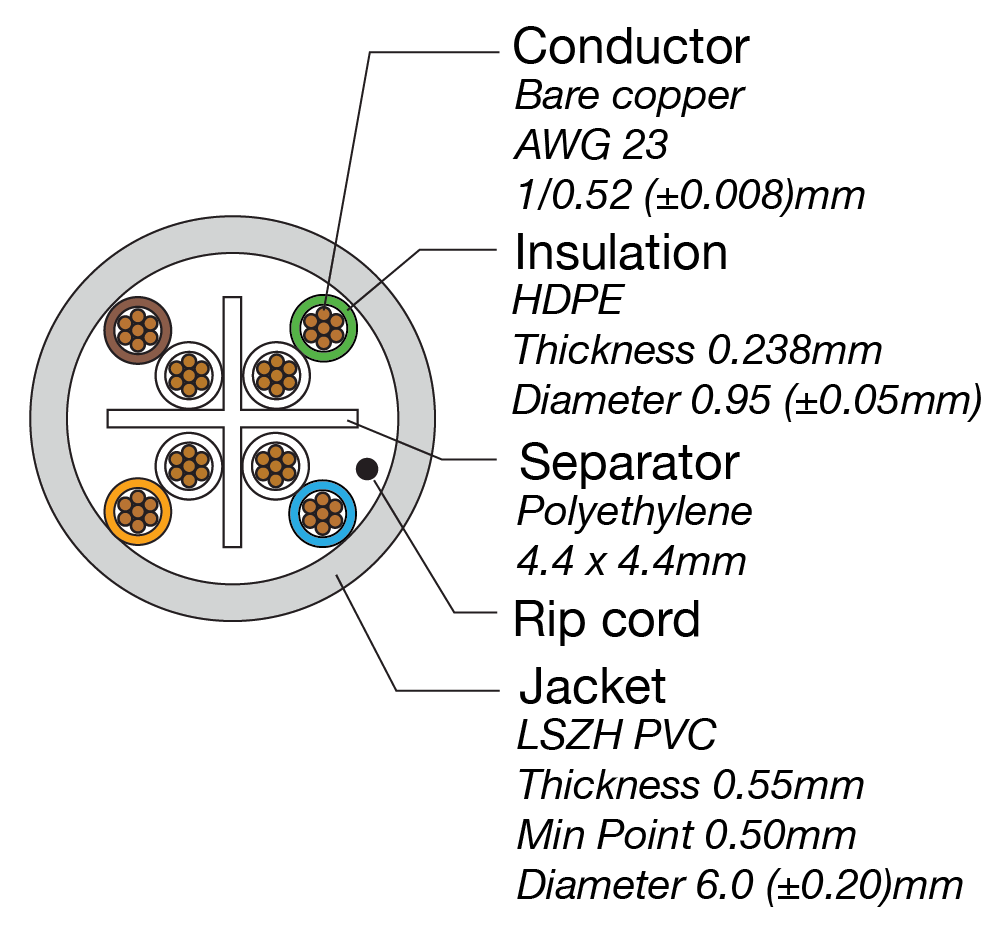
Cat6 Construction
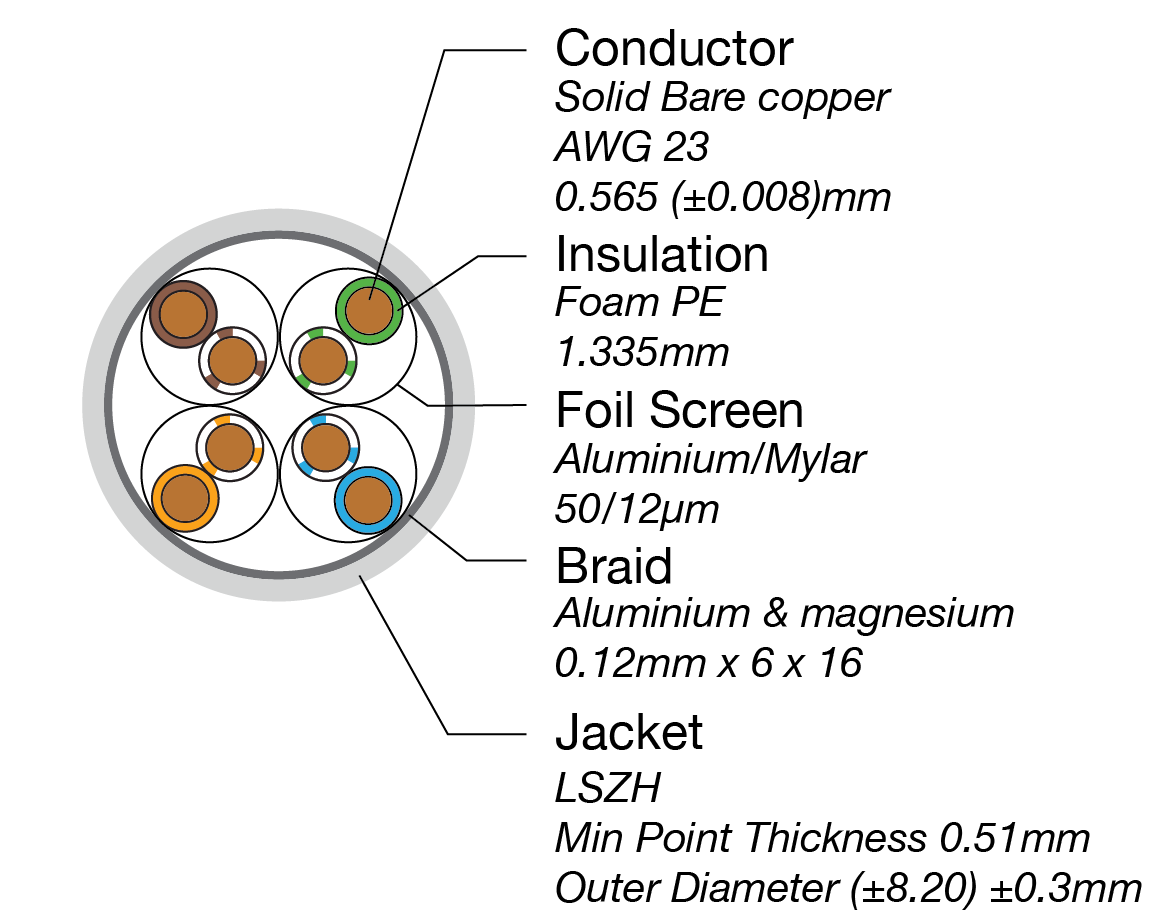
Cat6A Construction
Internal cable construction: Cat6 (left) vs Cat6A (right). Note the thicker conductors, additional shielding layers, and physical separator in Cat6A that enable superior performance and alien crosstalk protection.
Why Access Communications: We use 100% solid copper conductors (never CCA), LSZH jackets meeting Australian standards, and back everything with a limited lifetime warranty. Our Cat6A uses superior S/FTP double shielding (braid + foil) compared to competitors' basic F/UTP.
Bandwidth & Frequency Spectrum Comparison
| Cable Type | Operating Frequency | Visual Spectrum |
|---|---|---|
| Cat6 | 0-250 MHz |
250 MHz Unused capacity
|
| Cat6A | 0-500 MHz |
500 MHz (Full Spectrum)
|
Visual interpretation: Cat6A operates across double the frequency spectrum of Cat6. This wider bandwidth is what enables it to maintain 10Gbps speeds over longer distances without signal degradation. Think of it like a highway: Cat6 has 2 lanes, Cat6A has 4 lanes carrying traffic at the same speed.
Real-World Performance Comparison
| Performance Metric | Cat6 | Cat6A |
|---|---|---|
| Maximum Bandwidth (per second) | 1Gb (1 Gigabit) | 10Gb (10 Gigabits) |
| Time to Transfer 1 Terabyte of Data | Approximately 3 hours | Approximately 20 minutes |
| Operating Frequency Range | 0-250 MHz (capable to 500 MHz) | 0-500 MHz (capable to 600 MHz) |
| 10GBASE-T Performance Distance | Up to 55 metres (ideal laboratory conditions) 30-40 metres (real-world bundled installations) |
Full 100 metres (all conditions, bundled or isolated) |
| Data Transmission Standard | 1000BASE-T (Gigabit Ethernet) 10GBASE-T (limited distance) |
10GBASE-T (full 100m capability) |
| Connector Type | RJ45 8P8C (standard tolerances) | RJ45 8P8C (tighter tolerances required) |
What this means in practice: For businesses moving large CAD files, rendering video, backing up servers, or transferring databases, Cat6A's 10x speed advantage turns a 3-hour transfer into 20 minutes. That difference represents the cost of an entire workday. For a design firm transferring a 500GB project file to a client, Cat6 requires 1.5 hours of waiting. Cat6A completes the same transfer in under 10 minutes.
Bandwidth & Distance: The 55-Metre Problem
For everyday internet use: Cat6 handles standard speeds (up to 1Gbps) perfectly over 100 metres. If you're connecting computers to the internet, streaming video, or running a small office, Cat6 does everything you need.
For high-speed networks: Cat6A is essential if you need 10Gbps (10GBASE-T) speeds. Cat6 technically supports 10Gbps, but only up to 55 metres in perfect laboratory conditions. In real-world installations with multiple cables bundled together, that distance drops to 30-40 metres.
The 55-metre rating assumes perfect terminations, no patch leads, and cables running individually. Add patch leads (2-4 metres), wall plates, and bundled cables, and your effective 10Gbps distance drops significantly. Cat6A maintains full 10Gbps performance over 100 metres, regardless of conditions.
The cost impact: If your installer uses Cat6 and you later need faster speeds, you're paying for a complete re-cable in an occupied building. That's $20,000+ in costs versus spending an extra $2,800 upfront on Cat6A.
Alien Crosstalk in High-Density Installations
What most people don't realise: When cables run side-by-side in ceilings or conduits, they interfere with each other. This is called "alien crosstalk" (ANEXT) because it's interference from neighbouring cables, not from within the same cable.
Cat6 wasn't designed to handle alien crosstalk. The twist rates and conductor spacing handle internal interference but provide minimal protection against external interference. In installations with 15-20+ cables bundled together (common in offices, schools, apartment buildings), Cat6 performance degrades. You'll see slow speeds, dropouts, and connection problems that are expensive to diagnose.
Cat6A was specifically engineered to prevent alien crosstalk. It uses tighter cable twists, thicker jackets, and better internal separation to keep signals clean, even when dozens of cables run parallel for metres. For high-EMI environments (hospitals, manufacturing, data centres), shielded Cat6A (S/FTP) blocks interference entirely.
The diagnostic nightmare: Alien crosstalk creates intermittent faults. The cable tests fine with a basic tester (continuity checks pass), but performance issues only appear under load. Network speeds drop randomly, file transfers fail halfway through, and troubleshooting costs hundreds in callout fees. Cat6A prevents these issues.
Power over Ethernet & Heat Management
What is PoE? Power over Ethernet (PoE) means your network cable carries both data AND electrical power to devices like security cameras, Wi-Fi access points, and IP phones. It's incredibly convenient because you don't need separate power outlets at every device location.
PoE Power Levels
| PoE Standard | Max Power | Typical Use |
|---|---|---|
| PoE (802.3af) | 15.4W | IP phones, basic cameras |
| PoE+ (802.3at) | 25.5W | PTZ cameras, Wi-Fi APs |
| PoE++ (802.3bt Type 3) | 60W | High-power cameras, displays |
| PoE++ (802.3bt Type 4) | 100W | LED lighting, thin clients |
The problem: Running electrical current through copper generates heat. Cat6A uses thicker copper (23 AWG vs Cat6's 23-24 AWG) which handles heat better and dissipates it faster. In bundled installations with poor airflow, Cat6 cables carrying PoE can overheat. The cable works fine initially, but the heat accelerates insulation degradation.
Instead of lasting 15-20 years, your cable might need replacing in 3-5 years. The cost impact: Replacing failed cables in walls or ceilings costs 5-10x more than doing it right the first time. For any PoE+ (25.5W) or PoE++ (60-100W) applications, Cat6A is the safer specification.
Real-World Cost Analysis
| Item | Cat6 | Cat6A |
|---|---|---|
| Cable (50 runs × 40m avg = 2,000m) | $1,180 @$0.59/m Inc GST |
$2,780 @$1.39/m Inc GST |
| Connectors & hardware | $1,200 | $1,700 |
| Labour (installation) | $8,000 | $9,500 |
| Testing & certification | $1,200 | $1,200 |
| Total Project Cost | $11,580 | $15,180 |
| Cost Difference: $3,600 (31% more for Cat6A) | ||
The re-cable cost: If you install Cat6 and need to upgrade to support 10Gbps in 5-7 years, you're looking at $20,000+ in costs (cable, labour in an occupied building, business disruption, equipment hire). Spending an extra $3,600 on Cat6A now eliminates this risk entirely.
Installation realities: Cat6A is thicker (around 7.5mm diameter) compared to Cat6 (around 5.8mm). This means fewer cables fit into a standard conduit, it has a larger required bend radius, and requires precision tooling for termination. Factor in 15-20% extra installation time for Cat6A.
When to Use Each Cable
Use Cat6 for:
- Residential homes and small offices (under 10 employees)
- Cable runs under 40 metres
- Low cable density (fewer than 10 cables bundled)
- Standard internet use (browsing, email, streaming)
- Budget-sensitive projects
- Temporary or short-term installations
Use Cat6A for:
- Commercial buildings, schools, universities, hospitals
- Government facilities and data centres
- High-density installations (15+ cables bundled)
- Any PoE+ (25.5W) or PoE++ (60-100W) devices
- Cable runs over 55 metres that need 10Gbps capability
- Installations with a 20+ year expected lifespan
- Any building where re-cabling would be extremely costly
The 5-year rule: If there's any possibility the network will need 10Gbps speeds within 5 years, install Cat6A. The cost difference now is minimal compared to a complete re-cable later. As Wi-Fi 7 arrives and file sizes grow, the "standard" is shifting to Cat6A for all commercial installations.
You are now ready to choose
By following these guidelines, you can make an informed decision based on your specific requirements. You can be confident you're installing the correct cable specification for your needs, whether that's cost-effective Cat6 or future-proof Cat6A.
We stock a complete range of Cat6 and Cat6A cable in multiple colours, all manufactured with 100% solid copper conductors and LSZH jackets meeting AS/NZS 11801:2019 standards. Every cable is backed by our limited lifetime warranty.
Your Project, Perfected. That's The Access Advantage.
- Expert local support, since 1973: Don't waste time with guesswork. Our experts have seen it all and are ready to provide the right solution, right now. Your success is our business.
- Uncompromising Aussie quality: We live and breathe quality. From rigorous testing to official Australian certification, we guarantee every product we sell is built to perform and built to last.
- Your specs, your brand, our build: Off-the-shelf not cutting it? We specialise in building custom cables and assemblies to your exact specifications, branded for your business. Let's create it together.
- Guaranteed for life: Buy it once. Trust it forever. Our products are backed by a limited lifetime warranty, so you can invest in quality with zero risk. *Warranty excludes third-party brands such as HALO and UPS.
- Innovation that keeps you ahead: To ensure you always have access to the latest, most reliable solutions on the market, our catalogue is always changing with the tech landscape.
Let's get your project started.
Talk to an expert today for a custom quote or browse the solutions most relevant to your search.