
An expert guide to the Universal Serial Bus standard
Quick answer
- USB-C is the current dominant standard, reversible, and supports data up to 80Gbps and Power Delivery up to 240W.
- Not all USB-C cables are equal, a cable rated for USB 2.0 looks identical to one rated for USB4 but can't carry the higher data rates.
- Access Communications stocks USB cables and hubs to suit standard and high-speed needs.
Universal Serial Bus (USB) is the dominant connection standard for connecting peripherals, transferring data, and delivering power to computers, mobile devices, and AV equipment. Since its introduction in 1996, USB has evolved through multiple generations and connector types, with the latest USB4 standard delivering data transfer speeds of up to 80 Gbps and Power Delivery up to 240W.
This page covers USB versions, speeds, Power Delivery, cable construction, and the modern USB-C standard. For exact connector measurements and panel cutout sizes, see our USB Connector Dimensions guide. For pin assignments and wiring colour codes, see our USB Pinouts and Wiring guide.
USB standards at a glance
| Standard | Marketing name | Max data speed | Max power | Year |
|---|---|---|---|---|
| USB 1.1 | Full Speed | 12 Mbps | 2.5W (5V/500mA) | 1998 |
| USB 2.0 | Hi-Speed | 480 Mbps | 2.5W (5V/500mA) | 2000 |
| USB 3.0 / 3.1 Gen 1 / 3.2 Gen 1 | SuperSpeed | 5 Gbps | 4.5W (5V/900mA) | 2008 |
| USB 3.1 Gen 2 / 3.2 Gen 2 | SuperSpeed+ 10Gbps | 10 Gbps | Up to 100W with USB-PD | 2013 |
| USB 3.2 Gen 2x2 | SuperSpeed+ 20Gbps | 20 Gbps | Up to 100W with USB-PD | 2017 |
| USB4 | USB4 20Gbps / 40Gbps | 20 or 40 Gbps | Up to 240W with USB-PD 3.1 | 2019 |
| USB4 v2 | USB4 80Gbps | 80 Gbps | Up to 240W with USB-PD 3.1 | 2022 |
USB Type-C: the modern standard
USB Type-C is the current dominant USB connector. Introduced in 2014, it features a small, reversible 24-pin design that supports data, video, and power over a single cable. USB-C is now standard on phones, tablets, laptops, monitors, and an increasing range of professional AV equipment.
Key advantages of USB-C:
- Reversible: The connector works either way up, eliminating the awkward plug orientation problem.
- Single cable solution: A single USB-C cable can carry data (up to 80 Gbps), video (up to 8K), and power (up to 240W) simultaneously.
- Alternate Modes: USB-C supports protocols other than USB, including DisplayPort, HDMI, and Thunderbolt 3/4, making it the most versatile connector currently available.
- Backward compatibility: Adaptors are available to connect USB-C to legacy USB Type-A, Micro-USB, and other connectors.
Note that not all USB-C cables and ports are equal. A USB-C cable rated for USB 2.0 looks identical to one rated for USB4 80Gbps but cannot carry the higher data rates. Always check the cable specification matches your application.
Data transfer and speeds
USB devices indicate their speed by pulling either the D+ or D− line high to 3.3V at the device end. The pull-up resistors are also used by the host or hub to detect the presence of a device connected to the port.
Data signals are transmitted on a twisted pair (D+ and D−) using half-duplex differential signalling, which combats electromagnetic noise on longer cable runs. Signal levels are 0.0-0.3V for low and 2.8-3.6V for high, encoded using NRZI (Non Return to Zero Invert) with a sync field that aligns the host and receiver clocks.
USB 3.0 and later add additional differential pairs (SuperSpeed) for higher data rates, with USB-C using up to four high-speed differential pairs to achieve the fastest speeds.
USB Power Delivery
Standard USB ports supply 5V DC regulated power. The maximum current depends on the USB version:
- USB 1.1 / 2.0: 500mA (2.5W)
- USB 3.0 and later: 900mA (4.5W)
- USB Battery Charging (BC) 1.2: Up to 1.5A (7.5W)
- USB Power Delivery (USB-PD): Up to 100W (originally), now up to 240W with USB-PD 3.1
USB Power Delivery negotiates voltage and current dynamically, supporting 5V, 9V, 15V, 20V, 28V, 36V, and 48V profiles. This allows a single USB-C cable to charge anything from a phone to a high-performance laptop. Power pins are longer than data pins to ensure power connections mate first and unmate last.
Bus-powered hubs derive all their power from the USB bus. Powered hubs use their own AC adapter and provide better power distribution to downstream devices. Port-switching USB hubs isolate all ports from each other so a faulty device will not cause others on the same bus to also fail.
USB cables and cable length limits
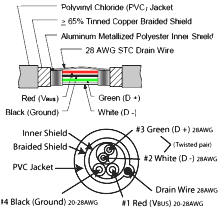
The twisted pair data wires and the drain wire are typically 28AWG, with the non-twisted power wires being from 28AWG to 20AWG. Cable length is restricted by the data rate, with higher speeds requiring shorter passive cables. Practical maximum lengths:
- USB 2.0: Up to 5m passive
- USB 3.0 / 3.1 Gen 1 (5 Gbps): Up to 3m passive
- USB 3.1 Gen 2 (10 Gbps): Up to 1m passive
- USB 3.2 Gen 2x2 (20 Gbps): Up to 1m passive
- USB4 (40 Gbps): Up to 0.8m passive
- USB4 v2 (80 Gbps): Up to 0.8m passive (active cables required for longer)
For longer runs at higher speeds, active cables, fibre-based USB extenders, or USB-over-Ethernet adaptors are required.
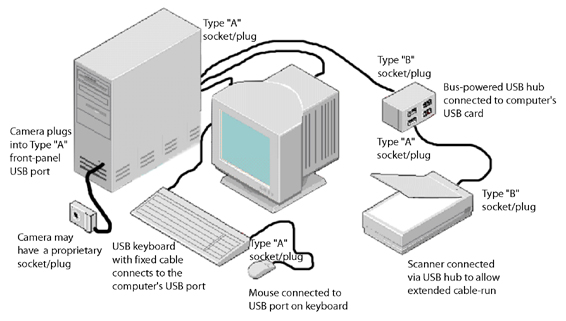
Cables have only plugs, and hosts and devices have only receptacles. Hosts have Type-A receptacles. If a device has a receptacle it is always Type-B. The most commonly used USB cable has a USB-A plug on one end and a USB-B plug on the other end.
USB connector types
USB has used several physical connector types over its lifetime. The current standard is USB-C, but legacy types remain in widespread use:
- USB Type-A: The familiar rectangular plug used on computer hosts, hubs, and peripherals. Still widely used.
- USB Type-B: The square plug used on larger peripherals like printers and scanners. Still common on equipment.
- Mini-USB Type-A and Type-B: Small-form connectors introduced in 2000, now largely replaced by Micro-USB and USB-C.
- Micro-USB Type-A and Type-B: Smaller still, became the standard for Android phones and accessories until USB-C took over.
- Micro-USB 3.0 Type-B: An expanded variant used on USB 3.0 external hard drives.
- USB-C: The current standard. Reversible, supports all modern USB speeds and Power Delivery up to 240W.
USB connector dimensions at a glance
A summary of the main USB connector sizes is below, measured at the contact opening of the receptacle (socket). For exact measurements including panel cutout dimensions, external housing sizes, and plug body lengths, see our complete USB Connector Dimensions guide.
| Connector type | Width (mm) | Height (mm) |
|---|---|---|
| USB Type-A | 12.0 | 4.5 |
| USB Type-B | 8.45 | 7.78 |
| Mini-USB Type-B | 6.85 | 3.0 |
| Micro-USB Type-B | 6.85 | 1.8 |
| USB Type-C | 8.34 | 2.56 |
Typical USB connections
USB ports have a Type-A or Type-C socket on the host side. Devices that use a separate USB cable have a Type-B, Mini-USB, Micro-USB, or USB-C socket. USB cables have one Type-A or Type-C plug on the host end and the appropriate device-side plug on the other end. Some devices may use proprietary plugs replacing the standard device-side connector.
Frequently asked questions
How can I tell what USB version a port is?
USB 3.0 and later ports are often (but not always) coloured blue inside the connector. USB 3.1 Gen 2 ports are sometimes coloured teal. The most reliable method is to check the device specifications or look for SS (SuperSpeed) or SS+ markings near the port.
Is a USB-C cable the same as a Thunderbolt cable?
USB-C is a connector shape. Thunderbolt 3, Thunderbolt 4, and USB4 all use the USB-C connector but support different protocols. A standard USB-C cable will not necessarily support Thunderbolt. Always check cable specifications before purchase.
What is the maximum length of a USB cable?
USB 2.0 supports up to 5 metres passive. USB 3.0 supports 3 metres. USB 3.1 Gen 2 (10 Gbps) is limited to 1 metre. USB4 is limited to 0.8 metres passive. For longer runs, active cables, fibre-based USB extenders, or USB-over-Ethernet adaptors are required.
Can USB-C charge a laptop?
Yes, with USB Power Delivery (USB-PD). USB-PD supports up to 240W (5A at 48V) with USB-PD 3.1, more than enough for most laptops including high-performance models. Both the cable and the charger must support the required power level.
What is USB OTG?
USB On-The-Go (OTG) allows a USB device, such as a phone or tablet, to act as a host. This means you can plug a keyboard, mouse, USB stick, or other peripheral directly into a phone using a USB OTG adaptor cable. Most modern phones with USB-C support OTG natively.
Why is my USB cable slower than expected?
The slowest component in the chain determines the speed. A USB 3.0 device connected with a USB 2.0 cable will only transfer at USB 2.0 speeds. Likewise a high-speed cable plugged into a USB 2.0 port will be limited to USB 2.0 speeds. Check both the cable specification and the port version.
Additional reference material
For visual identification of USB connectors alongside other AV interfaces, see our AV Connector Types guide.
From standard USB cables to custom assemblies, we have the right solution. Browse our USB cables and hubs range or talk to an expert to find the exact USB components for your needs.
Your Project, Perfected. That's The Access Advantage.
- Expert Local Support, Since 1973: Don't waste time with guesswork. Our experts have seen it all and are ready to provide the right solution, right now. Your success is our business.
- Your Specs, Your Brand, Our Build: Off-the-shelf not cutting it? We specialise in building custom cables and assemblies to your exact specifications, branded for your business. Let's create it together.
- Guaranteed for Life: Buy it once. Trust it forever. Our products are backed by a limited lifetime warranty, so you can invest in quality with zero risk. *Warranty excludes third-party brands such as HALO and UPS.
Let's get your project started.
Talk to an expert today for a custom quote or browse the solutions most relevant to your search.